Messages: Please use the inbrite.com forum for our discussions & Q&A.

News: It is reported that iTunes 9 is compatible with jailbroked iPhones... Now I got an iPhone 3GS. I will be posting something about it...

Sponsors links:

Showing posts with label MonsterPack. Show all posts

Monday, May 21, 2007

wolf2007 MP

wolf2007 MP 1.1 for V360
MP maker: coccolino_dbro

This is another awesome MP by coccolino_dbro. A real monster!

Check out the details and download at inbrite.com forum.

Sponsors links:

Sunday, March 04, 2007

iPhone theme in YuetMod MPs

New iPhone theme in YuetMod MPs
In YuetMod v2.2 and future releases, I will use this new iPhone theme. This theme is based on Woody's iPhoneMoto skin & DRM. I have enhanced it and fixed some bugs. I will continue to mod and enhance it. I hope you like it.


Download:
YuetMod iPhone Skin & DRM: [inbrite.com]

Sponsors links:

Tuesday, October 24, 2006

YuetMod v4.0 for R4513 AER

YuetMod v4.0 MonsterPack
for V360/L7 with R4513_AER firmware and 08.D0/08.A0/09.02 bootloader
This is a special version of YuetMod v1.8 compiled for V360/L7 with R4513_AER. I name it v4.0 just to distinguish it from v1.8.

Flash to it ONLY if your phone is with AER, you will not be able to flash to other firmwares after you flash this AER MP. If your phone is not AER, you should flash to the YuetMod v1.8.

It has everything from YuetMod v1.8 except those java apps, including iTunes, that require special permissions, will not work with AER. Just delete them.

For details of YuetMod v1.8, read [this post]

This MP will NOT lock your phone to any network. You can flash it no matter your phone is locked or unlocked, but it won't unlock your locked phone.

By downloading this MP file or re-posting any part of this article, you agree to the followings:
1. I am not responsible for any damage to your phone, so use it at your own risk.
2. You do not use this MonsterPack to get profit.
3. You do not provide direct download of the files. Instead, you must link to this webpage for downloading files.


Download the 2 rar files, put them in the same folder, then decompress the first one. The unrar program will combine the 2 parts and produce the SHX flash file.

For V360/L7 (R4513_AER) Download: 2 rar files
part 1 of rar: [filecloud] [mofile] [4shared]
part 2 of rar: [filecloud] [mofile] [4shared]

UPDATE: This MP was tested successfully on L7, by inoxious, using RSDLite 3.0; and it was also tested successfully on V360, by Ryan, using RSDLite 2.5. Thank inoxious & Ryan!

L7 Users, please read
For L7 users, you may want to fallback to the original key mapping. You can write this 005B-0001 seem file into your phone to get back the original key mapping. (This seem file works for V360 as well.)
Download 005B-0001 seem file: [filecloud] [mofile]

For those who want to change phone model from V360 to L7, please upload the following seem 0117_0001. Read my seem edit guide if you are not sure how to upload.
Download 0117_0001 seem file:[filecloud]

Sponsors links:

Sunday, October 08, 2006

YuetMod MPs for V360/L7

YuetMod MPs for V360/L7
(MP = MonsterPack = Monster Package = firmware)

I hope this table helps you to decide to use which version of YuetMod.

YuetModv1.xv2.xv3.x
Firmwarer4513_g_08.b7.abr or acr (retail versions)r4513_g_08.b7.b7r (patched by Yuet)r44419_g_08.d4.0fr (patched by Yuet)
Unique feature1. allow ringtones in card
2. support PTT
1. airplane mode
2. support PTT
3. send jar file via bluetooth
4.. allow customising system sounds
1.USB charging option
2. Lunar date in Datebook
3. Hot message in Message
4. image styles for camera
5. send jar/zip file via bluetooth
Common feature1. unlimited video recording
2. quadband
3. pictures in card can be set as phonebook image
4. keypad lock (Menu *)
5. 3x4 icons
6. IM and MobileQQ enabled
7. Engineering mode enabled
8. Innovative Flip-close operation
9. all skins use big photo of incoming caller
10. exclude LangPack from MonsterPack
11. a complete set of Mac icons for skins & DRM
12. different preview mode of pictures/phonebook photos for different skins
13. video styles
14. Store up to 50 numbers for received/dialed call
15. allow granting full permission to java apps
16, enable Battery Save, Java Proctection, TTY, Java App Loader, etc ...
17. iTunes installed
LimitationNo PTT
Some user feedbackBetter receptionBest reception
Most speedy
Bootloader requirement08.A0, 08.D0, 09.02 or 08.A209.02, 08.A0, 08.D0 or 08.A208.A0, 08.D0 or 08.A2
Firmware requirementR4513 firmwares except AER & E0R
(Here is the special YuetMod version for AER)
Modelfor V360, V360I, V360v or L7
DownloadYuetMod v1.xYuetMod v2.xYuetMod v3.x

Sponsors links:

Wednesday, October 04, 2006

YuetMod v1.x MP for V360/L7

YuetMod v1.9a MonsterPack
for V360/V360I/L7
v1.9a main changes: (07/06/2007)
v1.9a is tested V360 and also L7. It is compatible with 08.A0/08.D0 bootloader, and also compatible with sticky firmwares AER/E0R.
Details/support/download at this thread in the forum.

v1.8 main changes: (04/10/2006)
1. Fix iTunes problem of showing song name when hidden
2. Fix voice name recording problem for L7
3. Universal version for 09.02, 08.D0 & 08.A0 bootloader
4. GPRS auto detach after each session
5. "Voice Message" under "Multimedia"
6. IM with profiles for AIM/ICQ/Yahoo
7. Store up to 50 numbers for received/dialed call
8. Use ACR firmware for L7 (should not have "vodafone live" any more)

For change logs of YuetMod v1.7 and older versions, read [YuetMod v1.7]

For screenshots, look at [v1.8 screenshots]

This MP will NOT lock your phone to any network. You can flash it no matter your phone is locked or unlocked, but it won't unlock your locked phone.

By downloading this MP file or re-posting any part of this article, you agree to the followings:
1. I am not responsible for any damage to your phone, so use it at your own risk.
2. You do not use this MonsterPack to get profit.
3. You do not provide direct download of the files. Instead, you must link to this webpage for downloading files.


v1.8 is a full-flash MP, so you can flash it directly. Download the 2 rar files, put them in the same folder, then decompress the first one. The unrar program will combine the 2 parts and produce the SHX flash file.

YuetMod v1.8:
V360/V360I/V360v (09.02/08.D0/08.A0 bootloader) Download: 2 rar files
[inbrite.com]
V360/V360I/V360v (08.A2 bootloader) Download: 1 rar files
[inbrite.com]

L7 Download: 2 rar files
(06/10/2006 updated. tested successfully by Shahar. thanks!)
[inbrite.com]

L7 Users, please read
For L7 users, you may want to fallback to the original key mapping. You can write this 005B-0001 seem file into your phone to get back the original key mapping. (This seem file works for V360 as well.)
Download 005B-0001 seem file: [filecloud] [mofile]

For those who want to change phone model from V360 to L7, please upload the following seem 0117_0001. Read my seem edit guide if you are not sure how to upload.
Download 0117_0001 seem file:[filecloud]

Sponsors links:

Tuesday, September 19, 2006

YuetMod v3.x MP

YuetMod v3.2 MonsterPack
for V360/V360I/V360v/L7 with 08.D0/08.A0/08.A2 bootloader
This is a very speedy MP with best reception. I say it is speedy as I can feel it when I listen to my music and read my jar ebook at the same time. It is neat and tidy with the classic YuetMod interface and flip-close operation. The latest v3.2 has about 5M free space with 8 skins & 9 java apps & iTunes installed.

To use MotoMidMan with v3.1/v3.2, add "YuetMod" to Mode2 in MotoMidMan.ini file, as follows:
...
Mode2 = R4513 R3511 R479 R47A R4517 R478 YuetMod
...

v3.2 main changes: (21/03/2007)
1. New iPhone theme
2. iTunes 2.83 installed
(It is a bit tricky to start iTunes in this version. iTunes will auto-start when you reboot the phone, don't press any key after reboot, DON'T press any key when the screen "press * to default setting" is shown. Wait until the iTunes main menu is shown, press "Play" to play a song, once it starts playing, you can stop it by press RedKey or "Pause". You must do these steps otherwise you won't be able to start iTunes with the iTunes menu icon. If iTunes won't auto-start, take out the memory card, reboot phone, iTunes should start, insert memory card, then you can go to "Setting" in iTunes to set "Auto-start" to "Yes".)
3. Enable sending zip & jar files via bluetooth in video folder (Tip: for other file types, rename it to zip using phonemanager, then you can send via BT)
4. can make calls from recent calls list with flip closed
5. enable menu option to switch storage device for java/video/audio/picture
6. customized Flex for L7 version (correct phone model & less key remapping, only set CameraKey=VideoCamera, BrowserKey=iTunesKey, HeadsetKey=RightKey to jump to next songs.)
7. updated operamini to 3.1
8. set DAP & phonemanager to flip-insensitive

v3.1 main changes: (02/02/2007)
1. Rework on a new Flex, so all the bugs in v3.0 are gone
2. Allow setting full permission to java midlet (Also allow corelet, but still having problem starting the corelet)
3. Image styles for photo camera
4. Enable sending jar files via bluetooth in video folder
5. Remove hellomoto startup picture
6. Built-in websession & IM profile for US T-mobile (you can get other websession from this post)
7. Enable 300K MMS size limit
8. Record voice with flip closed, using Dictaphone
9. Camera key is back (but you can't record voice name any more. If you need to record voice name, set it back to voice key, following this guide)
10. Java Apps (Don't use motomidman to install java, should use bluetooth or Midway. more detail here)
- Dictaphone
- FileChanger
- GlobleTime
- Moto-TXT (English version)
- Opera Mini
- Phone Manager
- StopWatch
- Students calculator

v3.0 main changes: (19/09/2006)
1. R44419 0FR firmware (r44419_g_08.d4.0fr)
2. Universal version for bootloader 08.D0 and 08.A0
3. As usual, LP is not included, so your existing language will remain
4. "USB charging option" under "initial setup"
5. "Voice Message" under "Multimedia"
6. IM with profiles for AIM/ICQ/Yahoo
7. Lunar date in Datebook
8. GPRS auto detach after each session
9. "Hot message" folder in "Message"
10. Store up to 50 numbers for received/dialed call
11. new system sounds
12. Inherit everything from YuetMod v1.7 except the followings:
- No iTunes
- No ringtones on TF card
- No PTT setting
- No Airplane mode

For detail functions of YuetMod v1.7, read [YuetMod v1.7]

For screenshots, look at [v1.7 screenshots]

This MP will NOT lock your phone to any network. You can flash it no matter your phone is locked or unlocked, but it won't unlock your locked phone.

By downloading this MP file or re-posting any part of this article, you agree to the followings:
1. I am not responsible for any damage to your phone, so use it at your own risk.
2. You do not use this MonsterPack to get profit.
3. You do not provide direct download of the files. Instead, you must link to this webpage for downloading files.


v3.1
V360/V360I/V360v Download: 1 rar file
Bootloader 08.D0/08.A0 [4shared] [mofile] [filecloud]
Bootloader 08.A2: [4shared]

v3.2
V360/V360I/V360v (08.A0/08.D0/08.A2) or L7 (08.D0 R4513)Download: 1 rar file
[inbrite.com]

Sponsors links:

Friday, September 01, 2006

YuetMod v2.x MP

YuetMod v2.2 MonsterPack
for V360/V360I/V360v
This is a V360 MP with Airplane mode. If you die for the "Airplane mode" function, this MP is for you. Flash it before you fly.

This is not considered an upgrade of YuetMod v1.x series. Instead, it is an alternative.

What's Airplane mode?
Turn on Airplane mode will shut off all the signal for GSM, GPRS & Bluetooth network. The main purpose is to avoid interference with Global Positioning system during airplane flight. It can be used in other area where cell phone signal is restricted, such as hospital. You can also turn on airplane mode when you are sleeping; before giving your cell phone to a child; when you don't want disturbance but want to use other functions of the phone, etc ...

To use MotoMidMan with v2.1, add "YuetMod" to Mode2 in MotoMidMan.ini file, as follows:
...
Mode2 = R4513 R3511 R479 R47A R4517 R478 YuetMod
...

v2.2 main changes: (03/03/2007)
1. New iPhone theme (enhanced from Woody's iPhoneMoto skin & DRM) screenshots
2. New YuetMod iTunes 2.83
- MediaViewer(MV) & Phonebook tool plugins for English/Chinese/Russian
- Fixed bug of showing wrong song name in hidden mode
- Press and hold # key to open iShell
- Press 0 key at iTunes main menu to unload, or unload from iShell menu
- Reload iTunes using shortcut "Load iTunes"
- iTunes icon promoted to first leave of the phone menu
- Press "browser" key at home screen to start iTunes
3. Fixed bug for DAP
4. Removed cTheme

v2.1 main changes: (16/02/2007)
(Thank Ugunit89 for all the useful info.)
1. iTunes and iTunes menu icon
2. Allow setting full permission to java midlet and corelet
3. Prompt to select storage device when installing new java apps
4. Enable sending jar files via bluetooth (via video folder)
5. Remove hellomoto startup picture
6. Built-in websession & IM profile for US T-mobile (you can get other websession from this post)
7. Enable 300K MMS size limit
8. Store up to 50 numbers for received/dialed call
9. Make calls from recent calls with flip closed (thank storm shadow)
10. Record voice with flip closed, using Dictaphone
11. Java Apps (Don't use motomidman to install java (except corelets), should use bluetooth or Midway. more detail here)
- cTheme (skin changer, allow storing skins in memory card)
- Dictaphone
- FileChanger
- GlobleTime
- Moto-TXT (English version)
- Opera Mini
- Phone Manager
- StopWatch
- Students calculator
...

v2.0 main changes: (01/09/2006)
(Thank Ugunit89 again)
1. R4513 B7R firmware (r4513_g_08.b7.b7r)
2. Universal version for bootloader 09.02, 08.D0 and 08.A0
3. As usual, LP is not included, so your existing language will remain
4. "Airplane Mode" under "Connection"
5. add "Voie Message" under "Multimedia"
6. IM with profiles for AIM/ICQ/Yahoo
7. Minor mma changes
8. Inherit everything from YuetMod v1.7 except the followings:
- No iTunes
- No java applications which require special permission
- No ringtones on TF card
- Not for SLVR L7

For detail functions of YuetMod v1.7, read [YuetMod v1.7]

For screenshots, look at [v1.7 screenshots]

This MP will NOT lock your phone to any network. You can flash it no matter your phone is locked or unlocked, but it won't unlock your locked phone.

By downloading this MP file or re-posting any part of this article, you agree to the followings:
1. I am not responsible for any damage to your phone, so use it at your own risk.
2. You do not use this MonsterPack to get profit.
3. You do not provide direct download of the files. Instead, you must link to this webpage for downloading files.


Check your bootloader version to download the correct file according to the bootloader.

v2.0
V360/V360I/V360v (08.D0/08.A0/09.02 bootloader) Download: 2 rar files
[inbrite.com]
V360 (08.A2 bootloader) Download: 1 rar files
[inbrite.com]

v2.1
V360/V360I/V360v (08.D0/08.A0 bootloader) Download: 1 rar file
[inbrite.com]

v2.2
V360/V360I/V360v (08.D0/08.A0 bootloader)or L7 (08.D0 R4513) Download: 1 rar file
[inbrite.com]

Sponsors links:

Thursday, August 17, 2006

YuetMod v1.6 released

YuetMod screenshots
Here are some screenshots from YuetMod.


Check out different versions of YuetMod at [YuetMod MPs Chart].

Sponsors links:

Wednesday, June 28, 2006

YuetMod v1.4 for 08.D0

YuetMod v1.7d MP
for V360/L7 with 08.D0 bootloader
YuetMod v1.8 is released. Check it out at this link --> [YuetMod v1.8 for V360/L7].

=======================
This post is obsolete.

Sponsors links:

Friday, June 16, 2006

V360 MonsterPack - YuetMod V1.3

YuetMod MonsterPack
change log
YuetMod v1.8 is released. Check it out at this link --> [YuetMod v1.8 for V360/L7].


[more updated screenshots]

This MP will NOT lock your phone to any network. You can flash it no matter your phone is locked or unlocked, but it won't unlock your locked phone.

Neat & distinctive interface, modded to extreme. Innovative flip-close operation. Flash & Play! No other mod is needed.

Skins:
- Moto (Icons merged/modified from iTigerWB & MacOSXTiger)
- Black (Author unknown, modified & renamed by Yuet)
- BlueStrike (by ZoSo65, modified by Yuet)
- MacOSXPanther (by JamesFX, modified & renamed by Yuet)
- MacOSXTiger (by fearsim, modified & renamed by Yuet)
- Red (V360I stock skin, modified & renamed by Yuet)
- V3Razr (author unknown, modified by Yuet)
- SpideyAB99 (by Augustborn99, modified by Yuet)
(iTigerWB is created by fearsim, MacOSXTiger by PDidee)

Java Applications:
- PhoneManager (File system explorer)
- GlobalTime (Show global time with map)
- JKeyNote (Write text notes & save in phone directory)
- JZipMan (Compress files)
- Dictaphone (Record voice)
- Digital Audio Player
- MatraxBench (Benchmarking tool)
- MOTO-TXT (Text reader)
- motoTunes (Mobile iTunes db builder)
- Opera Mini (Browser)
- FileChanger (change mma_ucp or gain_table file)
- StopWatch
- Student Calculator

Menu Items (v1.6 & above version):
- personalise
- [setting]
-- initial setup -- phone status -- in-call setup -- call forward -- java setting -- [dialing services]
--- security --- car setting --- headset --- voice dial --- fixed dial --- ptt setting
- ringstyle
- [tools]
-- calculator -- browser -- datebook -- [webaccess] -- IM -- mobile qq
--- web shortcuts --- stored pages --- go to url --- history --- browser setup --- web sessions
- shortcuts
- [multimedia]
-- sound -- picture -- camera -- video -- video camera -- java
- [connection]
-- bluetooth -- USB -- sync -- network -- engineering
- alarm clock
- phonebook
- recent calls
- messages

v1.7 main changes: (25/08/2006)
(just a bug fix version for v1.6)
1. incorporate fix for "iTunes DB creator"
2. change video format from mp4 to 3gp
3. enable Protection for java midlets

v1.6 main changes: (17/08/2006)
(A bug found in iTunes DB creator, bug fix is released at [iTunes in YuetMod v1.6].)
(a complete Mac experience. Thank patricio for the ideas! Thank Ugunit89 for the iTunes!)
1. New DRM icons, from PDidee
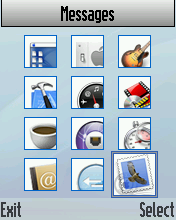
2. a complete set of Mac icons for skins & DRM
3. mma modified, icon mode in all submenus
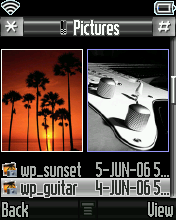
4. different preview mode of pictures/phonebook photos for different skins
- Black (two portrait thumbnails)
- BlueStrike (full screen preview)
- MacOSXPanther (two landscape thumbnails)
- MacOSXTiger (one big thumbnail)
- Red (list mode with eight lines, show small icons, name & number)
- V3Razr (three thumbnails)
5. enable changing of outer LCD image (/a/mobile/clyuet.gif), startup/shutdown animation (/a/custwakeup.gif & custgoodbye.gif) and sound (/a/mobile/audio/Cust_Start~up.mp3 & Power~down.mp3), using Phone Manager (Read [Tips using Phone manager] for details.)
6. enable browser splash screen
7. enable USB charging
8. new startup/shutdown animation/sound by PDidee
9. bug fix for Time autoupdate
10. iTunes, with DB creator and multi-language

v1.5 main changes: (21/07/2006)
1. Flip-close operation version 2
- remove "power off" function
- jump to next song using headset button when playing music with sound player
- pause/resume sound playing at home screen when sound player is hidden
- call out with speaker phone
- press voice key = press green key, press & hold voice key = press red key
2. select different menu and gain_table files using java app "FileChanger"
3. much softer startup & shutdown sounds
4. add one 3x3 menu skin (spideyAB99)
5. all skins use big photo of incoming caller
6. minor fixes for skins that can't display time in AM/PM
7. a few more java apps (FileChanger, StopWatch, Student Calculator)
8. exclude LangPack from MonsterPack (It won't change your existing lanaguge any more.)

v1.4 main changes: (28/06/2006)
1. add support for phones with 08.D0 bootloader

v1.3 main changes: (06/06/2006)
(Attend to the details to make it a perfect version!)
1. fix problem with VM Indicator
2. add Engineering
3. better sound
4. more shortcuts
5. add ringtones (music by TangChao)
6. add/enhance skins (remove baby face from skins)
7. add alot of java applications
8. record sound with flip close
9. minor DRM change
10. add Deletion confirmation

v1.2 main changes: (15/05/2006)
1. fixed problem with BlueStrike skin
2. 3x4 icons. Menu modified, compatible with 3x3 skins.
3. fixed problem with GPRS icon
4. Flip-close operation version 1 (access shortcuts with flip close, without sacrificing any existing function.)
5. Instant Messenger (IM) added
6. re-map keys (browser key = smart key, camera key = voice key, smart key = fire key, voice key = red key)
7. changed ringstyle icons & other DRM icons
8. added some ringtones
9. added one skin

v1.1 main changes: (03/05/2006)
1. Volume adjusted
2. Phonebook default picture changed
3. Outer screen picture
4. MP4 playing problem fixed
5. Do not show "GPRS standby" icon
6. iTunes 2.8 black (Menu 5 or shortcut 5)
7. keypad lock (Menu *)
8. Java application Mobile motoTunes added

v1.0 main features: (18/04/2006)
1. ABR Firmware (r4513_g_08.b7.abr)
2. LP0024 (English, Simplified Chinese, Bahasa Melayu)
3. customized DRM & Skin (iTigerWB by fearsim)
4. unlimited video recording
5. quadband
6. PTT enabled
7. reject call / stop Audio / power down / stop alarm with flip close
8. Voice key set to Red key & Brower key set to Voice key
9. MP3 in card can be set as ringtone
10. pictures in card can be set as phonebook image
11. adjusted gain table
12. customized power up/down sounds & animations
13. unlocked websession
14. disabled usb charging
15. fixed phonebook problem with Chinese Language
16. customized SEEM (many options enabled)
17. all Moto ringtones/pictures removed. (backup them if you like them)
18. use java application to record voice
19. Video styles enabled.

If you like this MP, please leave your comments. Enjoy your new V360! To get Language Packs, go to [LP Description].

To check bootloader version, Switch off your phone first, press and hold # and * keys then power on your phone.

Sponsors links:

yuetblog.blogspot.com Web