 | How do I repair my V360 from "S Blank Neptune LTE2" |
I bricked my phone about an hour ago, but I managed to save it from the "S Blank Neptune LTE2". I write down the steps here, and I hope you (if you bricked it) will be as lucky as me.
How did I brick it?I was doing some testing with my YuetMod monsterpack. I was flashing a Flex reflash file, and at the end there was checksum error. Normally it will be ok, but this time I clicked the mouse too fast. I clicked to close RSD Lite when the phone was still showing "SW Upgrade in progress...". As a result, the phone was dead. It wouldn't power on, and I couldn't turn it into bootloader screen. Well, I was prepared to say goodbye to my V360, but I want to save it and I don't want to disappoint you. Many of you came here to ask Yuet for solution. How can Yuet tell you "I bricked my phone and I can't unbrick it. No more YuetMod MPs."? I try my luck to connect my phone and RSD Lite can detect it as "S Blank Neptune LTE2". This gave me a dim light and a slim hope. I tried a few things, but I will only tell you the successful steps here.
What you need?P2K Easy Tool v3.9 Cracked (if you can't find it, this is a
hint.)
Disclaimer: Doing the following steps might void your warranty or damage your phone. I, Yuet, shall not be responsible for any damage to your phone by following the steps, so do it at your own risk.
If you want to post this article elsewhere or translate to other language, please quote the original author and link to this Blog.Warning: Don't try this if you have cingular L7 with 4517 firmware. These steps won't work for this model.
Steps:
1. Start p2k easy tool
2. take out battery from phone, and put it back
3. connect your phone to computer via usb
4. in p2k easy tool, select your phone mode (V360 for me)
5. click "Repair" tab, check "Full repair PDS zone (with DSP checksum)"
6. click "Do Selected Jobs", in a minute you should see messages like "repair ok"
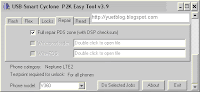
7. if you are unlucky and repair failed, try charge your battery and start from step 1 again
8. unplug & plug USB cable, take out battery and put it back, wait a few second for PC to detect your phone; click "Flash" tab, check "Flash SHX", make sure phone model is correct
9. double click the text box for "flash SHX" to open a full SHX file for your phone. For my case, I use my 2ER backup SHX
10. click "Do Selected Jobs", and wait for the flashing to complete
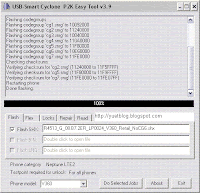
11. your phone is alive again
About my phone:
My phone is V360 with 08.A0 bootloader. I think these steps should work for V360/L7 with R4513 firmware, and maybe other motorola phones in the list of phone model in p2k easy tool. Anyway, do it at your own risk.


 since 16/06/2006

